Skip to product information
1 of 3
⭐⭐⭐⭐⭐ Excellent 4.8 | 2000+ Student Reviews

AI & GenAI Mastery portal

AI & GenAI Mastery portal

Regular price Rs. 9,999.00
Regular price Sale price Rs. 9,999.00
Sale Sold out

🔒 Secure Checkout · 📥 Instant Access · 📚 Learn Forever

View full details
AI & GenAI Developer Mastery — ByteMart
Launch offer: ✦ 35 modules · 151 lessons✦ 20 portfolio projects with source code✦ 9 interactive labs✦ 98 answered interview questions✦ Certificate on completion✦ Lifetime access, free updates✦
New For developers and students moving into AI roles

Learn to build the AI systems companies are hiring for.

35 modules, 151 lessons and 20 real projects that take you from Python basics to production RAG, agents and MCP — with interactive labs, module exams, interview prep and a certificate at the end.

  • One-time payment, lifetime access
  • All future updates included
  • Works on Mac, Windows and Linux
AI & GenAI Mastery — Dashboard
Dashboard
Your learning dashboard
Continue learning
The RAG pipeline end to end
Module 13 · RAG — Retrieval Augmented Generation
58 of 151 lessons done · 38%
Open lesson
Level 3 — GenAI Developer 1,140 XP to AI Engineer
🔥 12 days current streak
0%Overall progress
0Projects built
0%Quiz accuracy
0hTime invested
🧪
9 labsReal code in the browser
🛠️
20 projects99 source files included
🏅
CertificateEarned, not downloaded
PythonFastAPIOpenAI-compatible APIsLangChainLangGraphLlamaIndexChromaQdrantPineconeWeaviateFAISSHugging FaceOllamaMCPRedisPostgresDockerAWSPydanticWhisperTypeScript
35Modules
151Lessons
20Projects
9Interactive labs
1,363Quiz & exam questions
98Answered interview Q&A
42Coding exercises
236Glossary terms
40Visual diagrams
What you'll learn · 16-week roadmap

Everything an AI engineer needs — from Python basics to production.

Five phases, 35 modules, roughly 50 hours of reading — laid out in the order a working AI engineer actually needs them. Follow it top to bottom, or jump in at the phase that matches where you are.

1
Weeks 1–3

Foundations

The ground everything else stands on.

After this phase you canExplain AI vs ML vs deep learning, write the Python AI codebases actually use, and read a model's metrics without guessing.
6modules29lessons
🧱
Prerequisites: the foundations
6 lessons
🧭
AI & GenAI Roadmap
5 lessons
🐍
Python for AI Developers
6 lessons
⚡
AI-Assisted Development
4 lessons
📊
AI & Machine Learning Foundations
4 lessons
🕸️
Deep Learning Fundamentals
4 lessons
2
Weeks 3–5

Language models

How the machine actually works.

After this phase you canCall any model API with streaming, retries and tool calling, write production prompts, and ship your first five GenAI apps.
7modules32lessons
🔤
Transformers & LLM Fundamentals
7 lessons
✍️
Prompt Engineering
5 lessons
🧠
Reasoning Models & Test-Time Compute
4 lessons
🪟
Context Engineering
3 lessons
🔌
Working with AI APIs
4 lessons
🚀
Your First GenAI Applications
5 lessons
🧲
Embeddings in Practice
4 lessons
3
Weeks 5–9

Retrieval & agents

Where most production work lives.

After this phase you canBuild a RAG system over your own data, orchestrate agents with tools and memory, expose them over MCP and decide when to fine-tune.
9modules36lessons
🗄️
Vector Databases
4 lessons
📚
RAG — Retrieval Augmented Generation
4 lessons
🦜
LangChain
4 lessons
🦙
LlamaIndex
4 lessons
🤖
AI Agents
4 lessons
🔗
MCP — Model Context Protocol
4 lessons
🎛️
Fine-Tuning & Model Customisation
4 lessons
🏠
Open Source LLMs
4 lessons
👁️
Multimodal AI & Image Generation
4 lessons
4
Weeks 9–14

Production

The part interviews actually probe.

After this phase you canDeploy an AI service on AWS with a streaming frontend, defend it against prompt injection, evaluate it in CI and keep the bill predictable.
8modules34lessons
⚙️
AI Application Backend
4 lessons
💻
AI Frontend Development
4 lessons
🛡️
AI Security
4 lessons
⚖️
Responsible AI & Governance
4 lessons
📏
AI Evaluation
4 lessons
🔭
AI Observability & Production
4 lessons
🐳
Deploying AI Applications
4 lessons
💸
AI Cost Optimisation
6 lessons
5
Weeks 14–16

Interview ready

Proving it to someone else.

After this phase you canDesign document QA for 10 million users on a whiteboard, walk through your 20 projects, and answer the questions that decide the loop.
5modules20lessons
🧰
Real-World AI Projects
4 lessons
🎯
AI Engineer Interview Preparation
4 lessons
🏗️
AI System Design
4 lessons
🔍
Case Studies: How Real AI Products Work
4 lessons
🗺️
AI Career Roadmap
4 lessons
30 beginner lessons 72 intermediate 49 advanced Every module ends with its own exam · 70% to pass
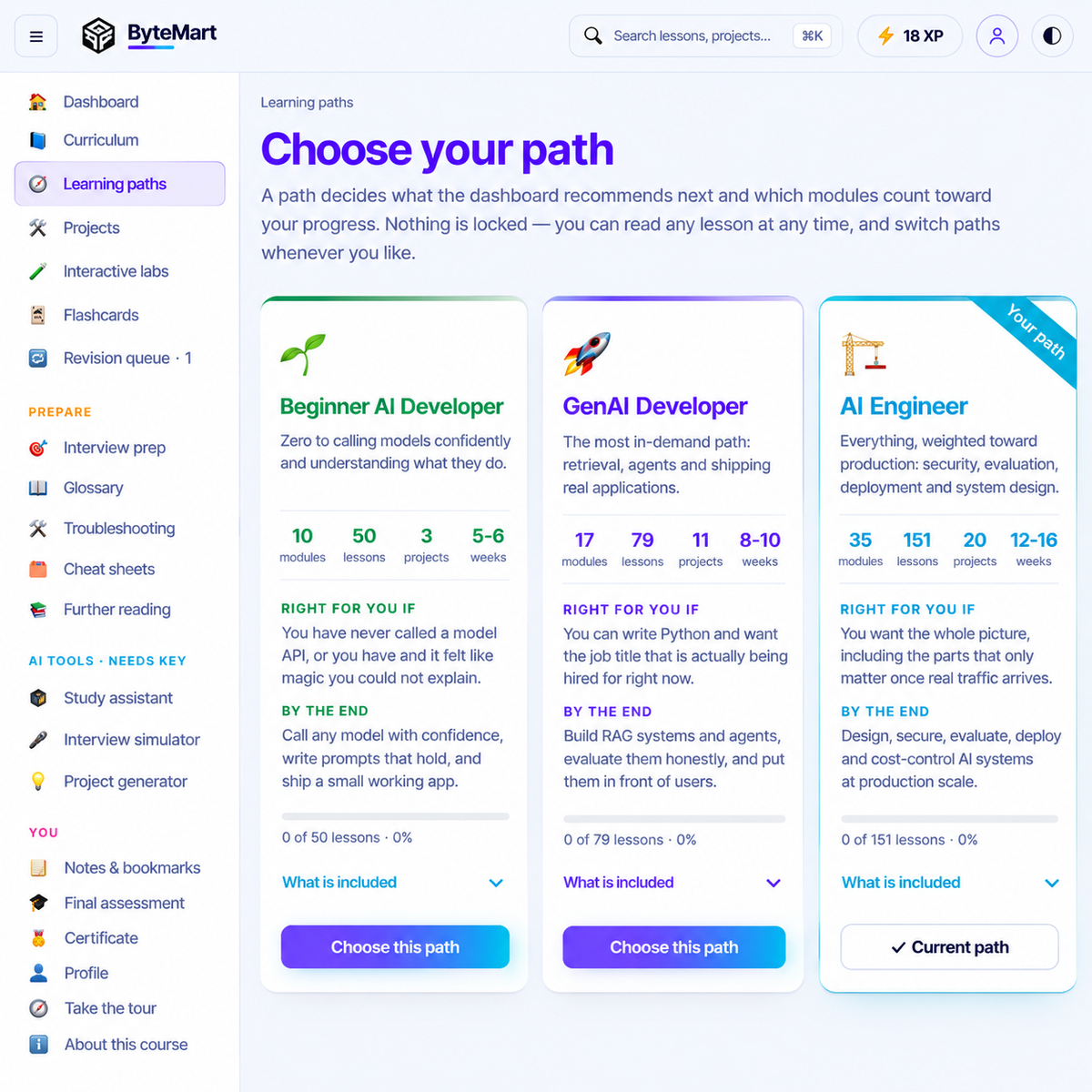
Your path · 3 tracks, 1 certificate

Pick a track. Earn a certificate that means something.

Three tracks through the same portal, sized for where you are starting from. Your track decides what counts toward your certificate — and the certificate is issued only when every requirement is met.

TrackDuration of 16 weeksWhat the certificate requires
Beginner AI DeveloperFor students and career switchers starting from basic programming
5–6 weeks
8 modules
60%exam average3exercises1project+capstone
GenAI Developer Most chosenFor working developers who want RAG, agents and shipping skills fast
8–10 weeks
11 modules
75%exam average8exercises2projects+capstone
AI EngineerThe full portal, weighted toward production, security, evaluation and system design
12–16 weeks
all 35 modules
80%exam average15exercises3projects+capstone
The certificate the portal generates: ByteMart, Certificate of Completion, AI & GenAI Developer Mastery, GenAI Developer path, with the holder's name, date of issue, a verified-completion seal and a certificate ID Actual certificate generated by the portal · downloadable as PNG or PDF
5 steps · no shortcuts

How you earn it

Your profile shows what is still outstanding for your track. Finish the list, sit the final assessment, print the certificate.

  1. 1
    Finish the lessons on your trackEvery lesson quiz counted, first attempts only
  2. 2
    Pass every module exam70% per exam, and your track's average overall
  3. 3
    Clear the exercises and projectsMarked complete in the portal, capstone included
  4. 4
    Sit the final assessmentA timed mixed paper from the exam bank
  5. 🏅
    Certificate unlockedGenerated with your name, track and date — print or share
Stay on track · Progress & XP

Streaks, XP, badges — progress that you can feel.

Five levels from AI Explorer to AI Architect — earn XP for every lesson, lab and project. Keep a streak going. Unlock badges.

Profile — your progress
Level 3 · GenAI Developer1,140 XP to AI Engineer
84%quiz accuracyfirst attempts only
🔥 12day streakbest: 19
58/151lessons done
Last 12 weeks
less more
Achievements · 5 of 12
🎯First lesson🔥7-day streak🧪Lab rat🛠️First project📚RAG builder🤖Agent wrangler🏗️Shipped it🎓Exam ace💬Interview ready🧠Reasoner🔒Secured🏆Capstone
XP levels
AI Explorer0 XP AI Builder400 GenAI Developer1,200 AI Engineer2,600 AI Architect4,500

XP for lessons, quizzes, labs, exercises and projects. Levels are milestones, not a substitute for the exams.

🔁
Revision queueWrong answers come back, spaced over days
🃏
FlashcardsGlossary and key facts from modules you have started
📝
Notes & bookmarksOn any lesson, searchable later
⌘
Search everythingCtrl/⌘ K across lessons, projects, glossary, Q&A
💾
Export & importMove your progress between devices
🌗
Light & dark themesLaptop at night, phone in daylight
Ready to start? Get the full 16-week roadmap today.One-time payment · · lifetime updates
Get instant access →
Learn by doing · 9 interactive labs

Nine things you cannot understand by reading about them.

Each lab runs inside the file and is linked from the lesson it belongs to. The Python playground executes real Python in the browser, so you can try every code sample without installing anything.

How models see text✂️Token visualiser

See how text splits into tokens and what each request costs.

Why did that request cost what it did?
How models see text🗺️Embedding map

Words placed in a 2D meaning-space you can pan around.

What does "similar meaning" actually mean?
How models see text👁️Attention explorer

Click a word to see what the model attends to.

What is the model looking at when it predicts?
Retrieval and generation🔎RAG simulator

Watch retrieval, reranking and grounded generation step by step.

Where exactly does a RAG answer come from?
Retrieval and generation✍️Prompt rewriter

Turn a weak prompt into a production prompt, part by part.

What separates a weak prompt from a production one?
Retrieval and generation🕸️Neural network

Signal forward, error backward, weights updating live.

What is actually happening during training?
Build and decide💸Cost calculator

Estimate the monthly API bill before you build the feature.

What will this cost me per month at scale?
Build and decide⚖️Model comparison

An editable table of models you keep current yourself.

Which model should I use for this job?
Build and decide🐍Python playground

Run real Python in your browser. No install, no setup.

Can I try the code without installing anything?
Featured lab

Run real Python. In your browser. Right now.

The Python playground executes the code from every lesson without an install, a virtual environment or a terminal. Edit it, break it, run it again.

  • Every code sample opens here with one click
  • Real Python 3, not a simulation — loops, classes, json, math
  • Output streams into the console as it runs
Interactive labs — Python playground▶ Run
tokens.py
import re, json

def tokenize(text):
    # crude but honest approximation
    return re.findall(r"\w+|[^\w\s]", text)

prompt = "Explain RAG to a backend dev."
toks   = tokenize(prompt)

print(f"tokens: {len(toks)}")
print(json.dumps(toks))
print(f"cost @ $2/M: ${len(toks)*2/1e6:.7f}")
Console
What you'll build · 20 portfolio projects

Twenty projects you can put on a resume.

Beginner builds to a multi-tenant RAG SaaS. Every project ships with its architecture, reference source code, a run guide and the questions an interviewer will ask about it.

★ Flagship · Advanced · 25–40 h

Production RAG SaaS

Multi-tenant, billed, deployed. Users upload documents, ask questions and pay for it — the one project you talk about for the whole interview.

Next.jstenant UI FastAPIauth · rate limits Postgres Qdrant LLM API Stripe
  • Tenant isolationRow-level security and per-tenant collections
  • Hybrid retrievalBM25 + vectors, reranked before the prompt
  • Usage billingMetered tokens, Stripe subscriptions, webhooks
  • ShippedDocker, CI/CD and AWS with tracing on
FastAPIPostgresQdrantDockerStripeAWS
Every project ships withArchitectureSource codeRun guideDeployment notesInterview Q&A
★ Flagship · 16–20 h

Multi-agent research system

A planner, two researchers and a critic that hand work to each other — traced end to end so you can see why.

🧠 Planner
🔎 Researcher🔎 Researcher
⚖️ Critic
LangGraphPythonTracing
★ Flagship · 8–12 h

MCP server for internal tools

Expose your own tools to any AI client over the Model Context Protocol, with auth.

tools/listget_customer(id)search_orders(q)create_ticket(title, body)refund(order_id) needs approval
PythonMCPAuth
★ Flagship · 14–18 h

AI agent with human approval

A tool-calling agent that pauses for sign-off before anything irreversible happens.

Agent wants to runrefund(order_id="A-2291")
ApproveReject
PythonTool callingApproval flow
16 more projects

From a first chatbot to a voice assistant

Three difficulty levels, each project building on the one before it.

  • AI email writer with tone control
  • Document summariser (map-reduce)
  • AI chatbot with memory
  • AI SQL assistant
  • Meeting summariser with action items
  • Resume analyser and scorer
  • Chat with your PDF (RAG)
  • AI interview coach
  • Semantic search for e-commerce
  • Research assistant with web search
  • Customer support bot with escalation
  • AI coding assistant for a repository
  • AI data analyst over CSVs
  • Voice AI assistant
  • Document intelligence for invoices
  • Company knowledge base assistant
BeginnerIntermediateAdvanced
Twenty projects, one price. Start building this week.One-time payment · · lifetime updates
Get instant access →
How you'll learn · 10-step lessons

Every lesson, built the same ten-step way.

Read it, run it, get it wrong, fix it. Every lesson takes you from a plain-language explanation to working code to a quiz that remembers what you missed.

1Concept 2Why it matters 3Analogy 4How it works 5Example 6Code, explained 7Try it 8Common mistakes 9Takeaways 10Quiz
#/lesson/m10l1 — The RAG pipeline end to end
Module 13 · RAG — Retrieval Augmented Generation · Intermediate · 16 min
The RAG pipeline end to end
62% read · 6 min left
Concept

Retrieval Augmented Generation answers from your documents instead of the model's memory: ingest, chunk, embed, store, retrieve the best chunks for a question, then generate an answer grounded in exactly those chunks.

pipeline.py▶ Run
# the whole pipeline, honestly sizedchunks   = chunk(docs, size=500, overlap=80)vectors  = embed(chunks)                # one call per batchstore.upsert(vectors, metadata=chunks)hits     = store.query(embed(q), k=8)hits     = rerank(q, hits)[:4]         # cheap, big winanswer   = llm(SYSTEM, context=hits, question=q)
✓ 4 chunks retrieved · answer grounded · 0.9 s
Common mistake

Chunking by a fixed character count and splitting a table or a code block in half — the retriever then returns fragments the model cannot reason over.

Quick check — where does a grounded answer come from?
The model's training dataThe retrieved chunks passed in the promptThe vector database directly
+10 XP
💬
Plain language first

Concept, why it matters and an analogy before any code.

🧩
Code you can actually read

Python and TypeScript examples explained line by line, plus 40 diagrams.

🧠
Mistakes, before you make them

What people get wrong, why, and the takeaways to revise from.

✅
Proof you understood it

Lesson quiz, module exam at 70%, misses return in the revision queue.

151 lessons · ~50 hours of readingDifficulty mix
20%48%32%
30 beginner 72 intermediate 49 advanced
Get hired · Interview preparation

Built to get you through the AI Engineer loop, not just the syllabus.

A dedicated Prepare area sits beside the curriculum: answered questions, cheat sheets, a glossary, troubleshooting for the errors you will actually hit, and a simulator that interviews you.

98answered interview questions
13question categories
9one-page cheat sheets
236glossary terms, all searchable

The four rounds, and what covers each one

  1. 1
    Screening

    "Explain RAG. What is a token. Why not fine-tune?"

    98 answered Q&A · 9 cheat sheets · glossary
  2. 2
    Technical deep dive

    Live coding, debugging a pipeline, reading an eval report.

    42 coding exercises · troubleshooting guide · labs
  3. 3
    AI system design

    "Design document QA for 10 million users."

    System design module · 4 real-product case studies · 40 diagrams
  4. 4
    Project walk-through & behavioural

    "Walk me through it. What broke? What would you change?"

    Interview questions for all 20 projects · behavioural bank · career roadmap
AI tools — Interview simulator · GenAI Engineer · Mid-level
InterviewerYour RAG system answers confidently but wrongly about 8% of the time. Walk me through how you would find out why, and what you would change first.
YouFirst I'd separate retrieval failures from generation failures — log the retrieved chunks per answer and check whether the right passage was even there. If it wasn't, it's chunking or embeddings; if it was, it's the prompt or the model…
Interviewer
Live scoring
Structure
8.8
Technical depth
8.0
Trade-offs named
7.0
Clarity
9.2
Strong hire signal · follow-up: how would you measure the fix?
Interview-ready in 16 weeks. Get instant access.One-time payment · · lifetime updates
Get instant access →
Bonus · 3 AI tools with your own key

Your own AI tutor, interviewer and project mentor — powered by your API key.

Add an Anthropic or OpenAI key in Profile → AI features and three tools switch on. Everything else works without one — this is a bonus, not a dependency.

Profile — AI features
Provider
Anthropic · ClaudeOpenAI · GPT
API key
sk-ant-••••••••••••••7Qx2stays in this browser
Connected · tools enabled
🎓
Study assistantAnswers from the lesson you are reading
🎤
Interview simulatorRole- and level-aware mock interviews, scored
💡
Project generatorA fresh brief in your domain and stack
Is this for you · 4 kinds of learners

Built for four kinds of people.

You need to be comfortable with basic programming; everything else is taught from the start.

🎓Final-year students

Know some Python, never shipped AI. Need a portfolio for placements.

Start: Beginner AI Developer
💼Working developers

Being asked to "add AI" at work. Skip basics, go to APIs, RAG, agents.

Start: GenAI Developer
📈Data scientists & ML engineers

Know models, need the production side — backends, evals, cost.

Start: AI Engineer
🔄Switching into AI roles

Interviews in the next few months. Want one structured place.

Start: GenAI Developer → Interview prep
Reviews · From existing learners

What learners say after going through it.

Real feedback from developers and students who bought the portal — on the roadmap, the hands-on sections and how the pieces finally fit together.

★★★★★

“The biggest advantage for me was having everything in one place. Prompt engineering, embeddings, RAG, agents, MCP and AI engineering concepts are explained in a way that's easy to follow.”

ASAnanya Sharma
★★★★★

“I was confused about where to start with GenAI. This portal gave me a proper roadmap instead of making me jump between random tutorials. The quizzes and practical sections helped me retain what I learned.”

AMArjun Mehta
★★★★★

“The AI engineering sections were my favourite. Understanding retrieval, evaluation, cost, latency and observability made me look at GenAI applications much more like a developer and less like just an AI user.”

KGKaran Gupta
★★★★★

“Clean interface, structured learning path and lots of interactive content. I especially liked the combination of lessons, quizzes, labs and projects. It feels much more engaging than a normal course.”

RSRiya Singh
★★★★★

“If you already know some programming and want to move into GenAI development, this is a really useful learning resource. The progression from fundamentals to building real AI applications is well thought out.”

AAAditya Arora
★★★★★

“The portal helped me connect the dots between different GenAI concepts. Before this, I knew about embeddings, vector databases, prompting and agents individually. Now I understand how they fit together in an actual AI application.”

VAVivek Aggarwal
★★★★★

“Much more structured than trying to learn GenAI from random YouTube videos and blogs. The roadmap, projects and interview preparation make it useful not just for learning but also for preparing for an AI engineering career.”

AJAman Jain
Join the learners above. Get the portal today.One-time payment · · lifetime updates
Get instant access →
Before you buy · FAQ

Questions people ask before buying.

The short, honest answers to what you get, what you need, and what happens after you buy.

📦What exactly do I receive?
A single HTML file, delivered instantly after payment. Open it in any modern browser and everything — lessons, labs, projects, exams, certificate — runs inside it. No install, no account, no internet needed after you have the file.
🐍Do I need to know Python already?
Basic programming in any language is enough. Module P covers the Python and maths prerequisites, and the Python for AI Developers module teaches exactly the Python that AI codebases use. If you are starting from zero, pair it with the ByteMart Python, ML & Data Science bundle first.
🤖Does it cover agents and MCP or just RAG?
Both, in depth. Dedicated modules on AI Agents, MCP, LangChain, LlamaIndex, fine-tuning, multimodal AI, reasoning models and context engineering, plus projects for a multi-agent system, an MCP server and an agent with human approval.
🔌Which AI provider do the projects use?
The lessons teach the OpenAI-compatible API shape most providers share, and the Open Source LLMs module shows how to run models locally with Ollama and Hugging Face. The model comparison lab is an editable table you keep current.
🔑Do I need an API key?
Not for the course. A key only switches on the three optional AI tools and is needed to run the projects you build yourself. The portal includes a key guide and a cost calculator so there are no surprises.
🏅Is the certificate recognised?
It is a ByteMart certificate of completion. Its value is that it cannot be obtained without passing the module exams, exercises, projects and final assessment — and the 20 projects you build alongside it are what recruiters actually look at.
💾Will my progress be saved?
Yes, in the browser you use. Export it from your profile before clearing site data or switching devices, then import it on the other machine.
🔄Do I get updates?
Yes. Corrections and new lessons ship as new versions of the file, free for everyone who has bought it.
Launch offer ·

Start today. Be interview-ready in 16 weeks.

Everything an AI engineer needs in one portal — 35 modules, 20 projects, interview prep and a certificate you actually earn.

  1. 1
    Pay once instead of
  2. 2
    Get the portal instantlyDelivered the moment payment clears
  3. 3
    Open lesson 1Nothing to install. Works on any laptop or mobile.
Get instant access One-time payment · instant delivery · lifetime updates
  • 151 lessons
  • 9 interactive labs
  • 20 projects + source
  • 1,363 questions
  • 98 interview Q&A
  • Certificate
  • Free updates for life
  • Telegram community ↗